
TheGrint | Golf Handicap & GPS
Grint LLCSports
4.51.29K Reviews
- Version
- Varies With Device
- Installs
- 1.00M
- Age Rating
- Everyone
Screenshots
Our Review of TheGrint | Golf Handicap & GPS
 Analysis by Appyee
When I decide whether to use a golf app, I care about more than the feature list. I want to know what it asks me to do during a round, whether its numbers are useful at the moment I need them, and how much effort it takes to keep a record afterward. TheGrint | Golf Handicap & GPS brings scorekeeping, course GPS and handicap tracking together, so its main appeal is having those parts of a golfing routine in one place rather than juggling a scorecard and separate tools.
A practical way to judge the trust trade-off
For me, trust starts with a simple question: does an app’s purpose justify the information and attention involved in using it? A golf GPS tool is most useful when I can consult it on the course, and score tracking works only if I enter honest, consistent results. Those choices make the app more personal than a basic course directory, but they are also the reason to think about how I want to use it before a round.
I would not treat a handicap figure or a GPS estimate as a substitute for my own judgement. The app can help me organize a round and make a club decision, but course conditions, wind, lie and my current form still matter. That distinction is especially important if I am comparing rounds or using a score to assess progress: useful records depend on careful input, not just on having an app open.
What I would check before relying on it
TheGrint is made by Grint LLC and is a sports app aimed squarely at golfers. It has been available since March 4, 2013, and its broad audience is reflected in an Everyone age rating. The app has a 4.7 average from around 5.3 thousand ratings, with about 1.2 thousand written reviews and over 1 million installs. Those figures suggest that it is an established option, though popularity alone cannot tell me whether its workflow suits my game.
I would take a moment during setup to review the choices the app presents and decide what I actually want to use. I would also check the current in-app settings and any permission prompts on my device rather than assume that every feature needs the same access. Permission details and data practices can change, so I would base that decision on what is visibly requested at the time, not on guesswork or a general promise about privacy.
The All-in-One Golfing Solution
First off, let’s talk about what makes TheGrint stand out in the crowded world of golf apps. This app isn’t just about keeping score; it’s a comprehensive toolkit designed to enhance your golfing experience. With features like a USGA-compliant handicap tracker, GPS rangefinder, and performance stats, it’s got everything you need to up your game.
Handicap Tracking Made Easy
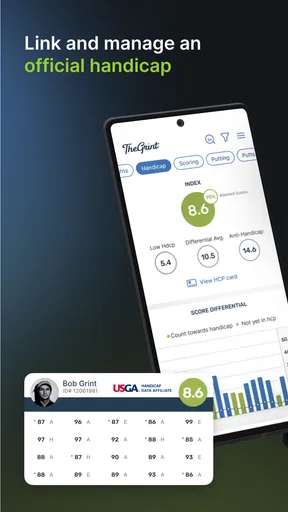
One of the standout features of TheGrint is its ability to calculate your golf handicap. Say goodbye to the days of scribbling numbers in a notebook. The app syncs with the USGA to provide an accurate and official handicap, ensuring you can compete on a level playing field. It’s super intuitive, and even if you're not tech-savvy, you'll find it straightforward to use.
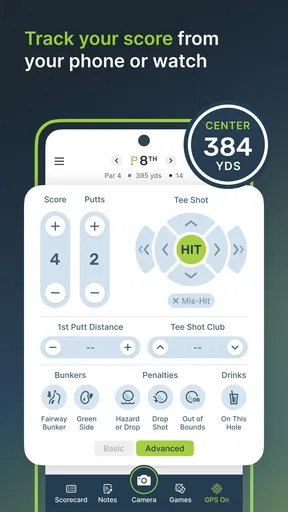
In everyday use, the biggest benefit of keeping scores in one place is being able to review your rounds without reconstructing them from loose cards later. I’d still enter scores while details are fresh and check the completed round before treating it as a dependable record. If I play casually and only want to remember who won, this level of tracking may feel like more work than I need; for someone who wants a handicap and a history of results, the habit can pay off.
GPS Rangefinder: Your Personal Caddy
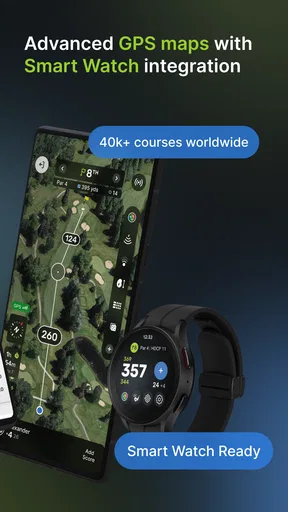
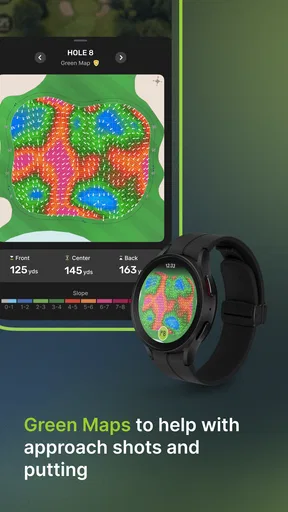
Next up, let’s dive into the GPS rangefinder. I was amazed by how precise it is. You can view distances to the front, middle, and back of the green, plus hazards and targets. It’s like having a personal caddy in your pocket. Whether you're on a familiar course or exploring new territory, this feature ensures you’re always making informed decisions on the course.
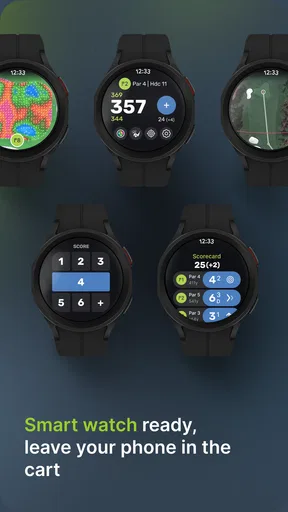
A useful way to work with those distances is to check the yardage before reaching for a club, then combine it with the lie and the shot you can realistically play. The number is a reference, not a command: a front or back distance does not account for every personal factor in the moment. On an unfamiliar course, GPS can be more convenient than hunting for a separate rangefinder, while a golfer who already owns a preferred device may not gain enough to switch.
Course coverage is a practical consideration too. The app’s GPS is associated with more than 40,000 courses, which gives traveling golfers a broad starting point when planning where to play. I would still confirm the selected course and hole at the start of a round, particularly if nearby layouts have similar names. That small check helps prevent a mistaken course selection from undermining the distances or score record.
In-Depth Performance Stats
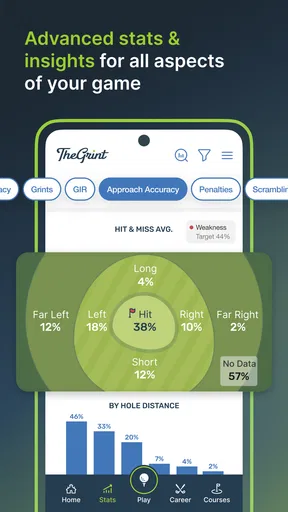
For those of us who love to dive into the data, TheGrint offers a suite of performance stats that are both detailed and easy to understand. You can track everything from fairways hit to putts per hole. The visual graphs and charts make it easy to spot trends and identify areas for improvement. Trust me, you'll feel like a pro analyzing your game with these tools.
The best use I’ve found for round statistics is to look for one recurring pattern, not to judge an entire game by a single bad day. If I keep losing shots around the green, for example, that gives me a more specific practice focus than simply deciding that I need to “play better.” To make comparisons meaningful, I’d record rounds consistently and avoid drawing a firm conclusion from a tiny sample; changing courses or playing conditions can affect the numbers too.
Community and Social Features
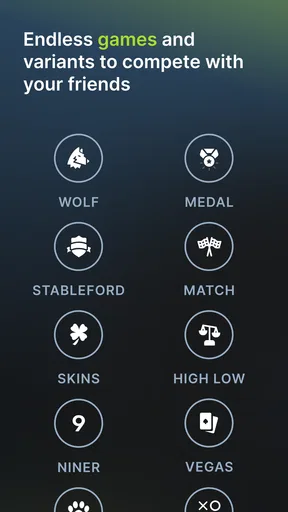
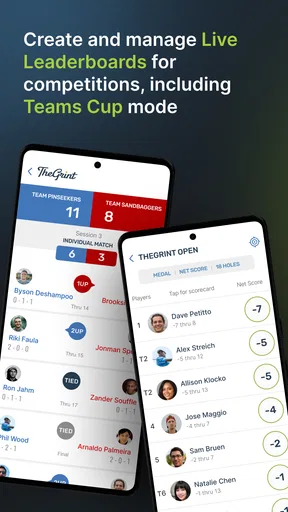
Golf is as much about camaraderie as it is about competition, and TheGrint’s social features are perfect for both. You can connect with friends, share scores, and even create leaderboards for a bit of friendly rivalry. It’s a great way to stay connected and engage with fellow golfers, especially when you can't hit the links together.
Social sharing is optional in spirit even when it is part of the appeal: I would use it only for the rounds and contacts I actually want to discuss. A private practice round and a weekend match do not have to serve the same purpose. If I prefer to keep golf records personal, I can focus on scorekeeping, GPS and statistics rather than making the social side central to the experience.
User Experience and Design
Now, let’s talk about the app’s design. The interface is clean, modern, and incredibly user-friendly. Navigation is a breeze, with intuitive menus and a layout that makes sense. Whether you’re tech-savvy or a bit of a Luddite, you’ll find getting around the app to be straightforward.
There is still a real on-course trade-off: entering information and checking a screen takes attention away from the people and play around me. I’d set up what I can before teeing off, keep phone use brief between shots, and avoid trying to analyze every statistic while the group is waiting. Golfers who want a completely screen-free round, or who dislike recording details as they play, may be happier with a pencil-and-card routine.
Availability and Pricing
TheGrint is available for both Android and iOS, and setting it up is a piece of cake. You can start with a free version, which offers basic features, but if you’re serious about your golf game, I’d recommend going for the premium version. The added features are well worth the subscription fee, providing a much richer experience.
The app is free to download, with in-app purchases ranging from $0.99 to $197.99 per item. I would begin with the free experience and decide whether I use its core tools often enough to justify any purchase, rather than paying simply because I play golf. The right choice depends on which features matter to my routine and what the current purchase options include; occasional players may be perfectly content keeping things simple.
For a typical Saturday round, I would select the course before arriving, use GPS as a quick reference when choosing a club, and enter scores as I go. Afterward, I could review the round and look for one useful pattern to carry into practice. That workflow shows where the app is strongest: it connects decisions on the course with a record I can revisit. It also makes clear why it is not ideal for someone who wants only a one-off distance check or does not want to track scores.
Compared with a paper scorecard, TheGrint can bring handicap tracking and performance review into the same routine, but paper remains quicker and less distracting for golfers who only need a tally. Compared with a standalone rangefinder, it combines distance help with scoring and stats, while a dedicated device may suit players who prefer not to handle a phone during play. I see it as a useful all-round option, not a reason every golfer needs to replace tools they already trust.
In conclusion, TheGrint | Golf Handicap & GPS is a must-have for any golfer looking to take their game to the next level. It’s packed with features that cater to beginners and seasoned players alike, and its blend of functionality and ease of use makes it a standout choice. So, grab your clubs, download the app, and get ready to see your game improve. Happy golfing!
Who will get the most from it
I’d recommend it most to golfers who play regularly, want an official handicap in their routine, and are willing to record enough detail to learn from their rounds. It is also a sensible fit for someone who travels between courses and likes having GPS and score history together. A beginner can use it to build a consistent record, but should not feel pressured to study every stat before simply learning the game.
By contrast, I would skip it if I rarely play, dislike entering scores, or already have a smooth system that gives me everything I need. It may also be the wrong choice for anyone who expects GPS yardages to make club selection automatically or who wants an app to replace lessons and practice. Its value comes from supporting a golfer’s decisions and habits, not making those decisions for them.
A measured recommendation
My overall view is positive, with one condition: use the parts that genuinely improve your rounds and be deliberate about the rest. Start with the basic workflow, verify your course and entries, and review only the statistics that lead to an action you can take. That approach makes the app more useful and keeps data collection from becoming an end in itself.
At a 4.7 average, TheGrint is clearly popular with many golfers, but the most important test is whether its combination of handicap, GPS and round analysis fits the way you play. I would give it a try if I wanted one place to manage those tasks; if simplicity, minimal phone use or a dedicated rangefinder matters more, a different setup may suit me better.
Verdict
Strengths of TheGrint | Golf Handicap & GPS
- Easy-to-use interface for quick navigation.
- Accurate GPS tracking on golf courses.
- Comprehensive stats and score tracking.
- Seamless integration with USGA handicap system.
- Active community for sharing and challenges.
Limitations of TheGrint | Golf Handicap & GPS
- Limited features in free version.
- Occasional GPS signal issues.
- Requires stable internet for full functionality.
- Some features need in-app purchases.
- Can drain phone battery quickly.
Similar Picks in This Category
View All
BeSoccer: Soccer Live Score
BeSoccer apps4.3

Cricbuzz - Live Cricket Scores
Cricbuzz.com3.7

NFL
NFL Enterprises LLC2.4

Da Fit
MO YOUNG LIMITED3.6

ESPN
Disney4.5

LiveScore: Live Sports Scores
LiveScore Limited4.5
Frequently Asked Questions
What features does TheGrint offer for golfers?
TheGrint provides a comprehensive set of features including GPS rangefinder, live scoring, statistics tracking, and a golf handicap calculator. It also offers social features like score sharing and leaderboards, making it easier to connect with friends and compare performances. This makes it an all-in-one app for both casual and serious golfers.
How accurate is TheGrint's GPS rangefinder?
TheGrint's GPS rangefinder is highly accurate, providing precise yardages to the front, middle, and back of the green for over 37,000 golf courses worldwide. It is updated regularly to ensure accuracy, making it a reliable tool for improving your golf game by helping with club selection and strategy on the course.
Can I track my golf statistics with TheGrint?
Yes, TheGrint allows you to keep detailed statistics of your rounds. You can track fairways hit, greens in regulation, putts per hole, and more. This statistical insight helps you analyze your strengths and weaknesses over time, offering valuable data to improve your overall game performance.
Is TheGrint compatible with both Android and iOS devices?
TheGrint is available for both Android and iOS devices, ensuring compatibility across major platforms. This allows users to enjoy its features regardless of their smartphone preference. The app is optimized for a smooth experience on both operating systems, providing the same level of functionality and user-friendly interface.
Does TheGrint offer a free version or only paid subscriptions?
TheGrint offers a free version with basic features, which is perfect for casual golfers. For advanced features like detailed statistics, live scoring, and more personalized data insights, there are premium subscription options available. These plans provide a more in-depth golfing experience for users looking to enhance their game.
